
SpecCite
Use AI to read large documents and get authentic and cited information without any Halluciantion.
TL;DR
SpecCite is a tool that lets you upload a technical PDF, a chip datasheet, an internet standard, a protocol spec — and ask it questions in plain English, like you'd ask a colleague. The twist, it's built to never guess. Every answer points back to the exact page and section it came from, and if the document doesn't cover something, it says so instead of making something up. That single design choice is the whole point of the project, while learning other concepts of AI.
The Problem
Imagine your job requires you to constantly read 300-page manuals — not novels, but dense technical documents full of tables, numbered sections, and precise details where a single wrong number could cause real damage (think: the wrong voltage sent to a chip). Today, most people do this with Ctrl+F, hoping the right keyword is in the document verbatim. Skim, misread, re-read, ask a colleague. It's slow, and it doesn't scale.
Generic AI chatbots don't fully solve this, they're happy to sound confident about a technical detail even when they're wrong, because they're drawing on everything they've ever read, not just the one document in front of you. For someone deciding how to wire a circuit board, "sounds confident" isn't good enough.
SpecCite exists to close that gap: an assistant that only knows what's in your document, and is honest about the difference between "I found this" and "I don't know."
What SpecCite Actually Does
Think of it less like a chatbot and more like a research assistant who has been handed exactly one book, told to read it cover to cover, and given one strict rule: only answer from this book, and always tell me which page you got it from.

That's the whole experience from the outside. The interesting part is what happens between "SpecCite reads every page" and "you get an answer" — that's where the citation and refusal rules actually get enforced.
How It Works, Step by Step
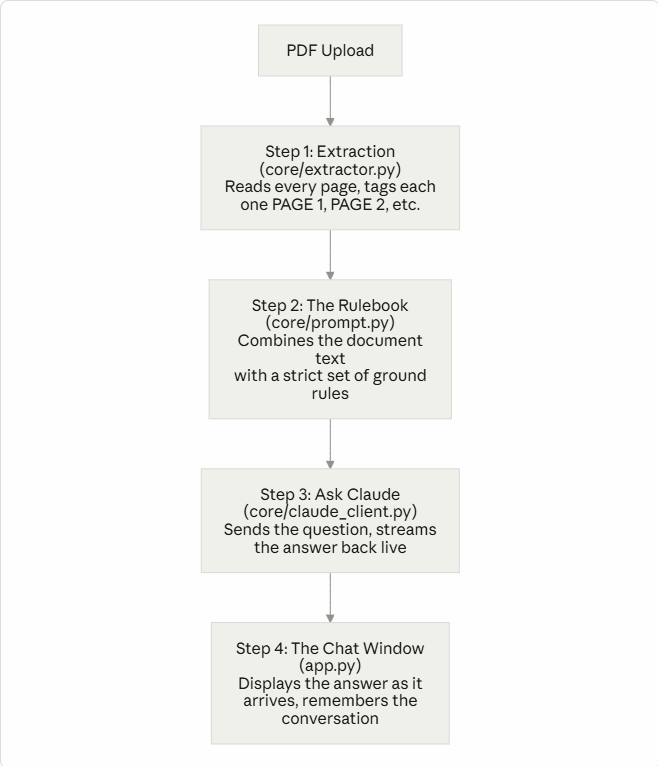
Here's the full path a question takes, from upload to answer:
Step 1 — Reading the document
When you upload a PDF, a library called PyMuPDF opens it and pulls the text out one page at a time. This matters more than it sounds: SpecCite tags every chunk of text with the page it came from — [PAGE 47], [PAGE 48], and so on — before anything else happens. That tagging is what makes citations possible later. If this step didn't happen, there'd be no way to later say "this came from page 47" — the AI wouldn't know either.
If a PDF is a scanned image with no actual text layer (common with old datasheets), extraction fails on purpose rather than pretending to have read something it couldn't.
Step 2 — Giving the AI a rulebook
This is the step most people skip when they build "AI chatbots," and it's the step that makes SpecCite trustworthy instead of merely fluent.
Before Claude (the AI model) ever sees your question, it's handed a system prompt — think of it as a job description or an onboarding packet for a new hire, read before their very first task. It lays out rules like:
Answer only from the document provided — never fill gaps with outside knowledge.
Always cite the section and page:
(Section 4.2, p.47).If the answer isn't clearly in the document, say so — don't guess.
Never estimate register values, voltage levels, or timing numbers. A wrong guess here can damage real hardware.
The entire extracted document text rides along inside this same rulebook — so by the time Claude answers a question, it isn't working from general knowledge about electronics; it's working from this specific document, with a page number stapled to every fact.
One efficiency trick worth knowing: this document text is cached after the first question. So if you ask five follow-up questions in one session, SpecCite doesn't have to re-send the entire 150-page document five times — it's reused, which makes later questions cheaper and faster.
Step 3 — Asking, and getting a live answer
Your question, plus the rulebook and document, gets sent to Claude. Instead of waiting in silence for a full paragraph to come back, the answer streams in — you see it appear word by word, the same way you'd watch someone type a reply in a chat app. It feels faster even when the total time is the same, because you're not staring at a blank screen wondering if anything is happening.
Step 4 — Remembering the conversation
Each question and answer gets added to a running history, so you can ask a follow-up like "what about at -40°C?" without repeating the whole original question — SpecCite already has the context of what you asked before.
The Most Important Part: Why It Won't Lie to You
This deserves its own section because it's the actual point of the project, not a footnote.
AI models can "hallucinate" — state something confidently and fluently that simply isn't true. For casual use, that's an annoyance. For an engineer reading a register map, a hallucinated voltage value could fry a board. SpecCite is built around two rules that directly target this:
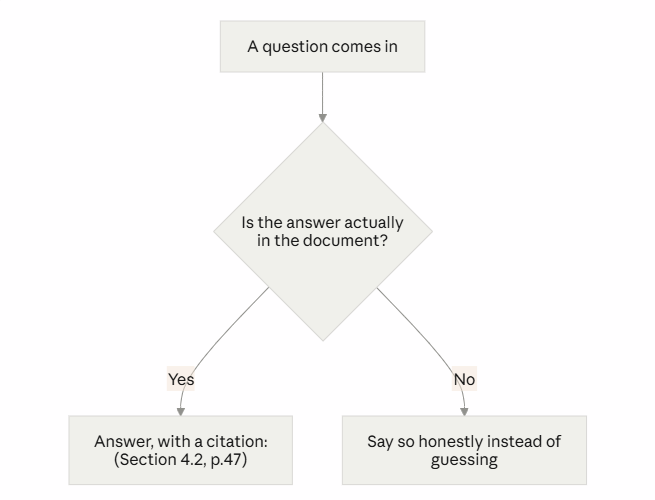
Citation enforcement. Every answer has to name a section and page. This isn't just a nice-to-have for trust — it also gives you an easy way to double-check the AI's work in five seconds, instead of having to take its word for it.
Refusal on unknowns. If the document genuinely doesn't cover something, the honest answer is "this isn't in here," not a plausible-sounding guess. That's a hard behavior to force out of an AI model — it's done today through careful instructions (the rulebook from Step 2), which is a real limitation worth naming honestly: instructions reduce hallucination, they don't mathematically guarantee it never happens. Testing this behavior against real documents and real edge-case questions is an explicit, ongoing part of building this tool.
A Few Terms, Translated
If you're new to AI, these words come up constantly and rarely get explained plainly:
| Term | What it actually means here |
|---|---|
| Context window | How much text the AI can "hold in mind" at once for a single question — like short-term memory. SpecCite's whole document has to fit inside it. |
| Token | Roughly a chunk of a word. AI models measure text in tokens, not characters — a 300-page datasheet is often ~150,000 tokens. |
| System prompt | The rulebook/instructions the AI is given before it sees your actual question. |
| Hallucination | When an AI states something false with total confidence, because it's generating plausible-sounding text rather than looking anything up. |
| Streaming | The answer appearing word-by-word in real time, instead of all at once after a delay. |
| Caching | Reusing something already sent (like the document text) instead of resending it for every single question — faster and cheaper. |
What's Next
Right now, SpecCite hands the entire document to the AI for every question. That works well for a single datasheet or RFC, but it has a ceiling — eventually a document (or a pile of documents) gets too big to fit in the AI's "short-term memory" at once. The next version changes the approach:
| Today (V1) | Coming (V2) | |
|---|---|---|
| Analogy | Handing the AI the entire book and asking it to answer from memory | Hiring a librarian who fetches only the relevant pages before answering |
| Good for | A single datasheet or RFC, even a long one | Huge specs (500+ pages) and searching across a whole shelf of documents at once |
| Tradeoff | Simple, nothing to configure | More moving parts, but scales much further |
This is a common pattern in AI tools generally — start simple, add retrieval (this "librarian" approach is usually called RAG, Retrieval-Augmented Generation) once the simple version hits a real limit, not before.